My quick lab experiment on the Event-Driven, Single Threaded and Asynchronous aspects of Node.js
During the prolonged lockdown of 2020 due to the lethal Covid-19 pandemic, I challenged myself to refresh and enhance my Javascript knowledge. In the process I met Node.js and I studied about React. Unfortunately I didn't create a meaningful website or webapp using my growing Javascript knowledge. This was that until I met 11ty an SSG which is based on Node.js. While only a basic knowledge of Javascript and Node.js is necessary to use 11ty, I found myself willing to learn the 'behind the scene' aspects of Node.js.
Today, I did a quick hands on experiment to learn a bit more about the Event-Driven, Single Threaded and Asynchronous aspects of Node.js. Here is the lab experiment.
Starter
mkdir nodejs-experiment
cd nodejs-experiment
npm init -y
npm install express
touch experiment1.js
nano experiment1.js
The contents of experiment1.js are as follows:
const express = require('express');
const app = express();

let requestCount=0;

app.get('/', (req, res) => {
++requestCount;

req.customSerialId=requestCount;
req.customStartDate=new Date();

console.log("Received a request with a customSerialId="+req.customSerialId);

req.customEndDate=new Date();

res.send(`{ "serialId": ${req.customSerialId}, "startDate": ${req.customStartDate}, "endDate": ${req.customEndDate} }`);
});


app.listen(3000, () => console.log('Server ready'));
I ran experiment1.js as follows:
node experiment1.jsI then opened two terminals (preferably as tabs) and issued the following command on both of them
curl http://localhost:3000/Everything is okay. But so far no meaning lessons learnt about the Event-Driven, Single Threaded and Asynchronous aspects of Node.js. The only no-brainer lesson is that Node.js is capable of running multiple requests.
Blocking event
npm install moment
touch experiment2.js
nano experiment2.js
The contents of experiment2.js are as follows:
const express = require('express');
const moment = require('moment');
const app = express();

let requestCount = 0;

app.get('/', (req, res) => {
  ++requestCount;

  const startMoment = moment();

  req.customSerialId = requestCount;
  req.customStartDate = new Date();
  req.customCategory = requestCount % 2 === 1 ? "Delayed" : "Fast";

  console.log("Received a request with a customSerialId=" + req.customSerialId);

  if (requestCount % 2 === 1) {
    while (moment().diff(startMoment, 'minutes') < 2) {
      //For the odd numbered requests just delay with about 2 minutes doing nothing
    }
  }


  req.customEndDate = new Date();

  res.send(`{ "serialId": ${req.customSerialId}, "category": ${req.customCategory}, "startDate": ${req.customStartDate}, "endDate": ${req.customEndDate} }`);
});


app.listen(4000, () => console.log('Server ready'));
I ran experiment2.js as follows:
node experiment2.jsI then opened two terminals (preferably as tabs) and quickly issued the following command on both of them
curl http://localhost:4000/Findings
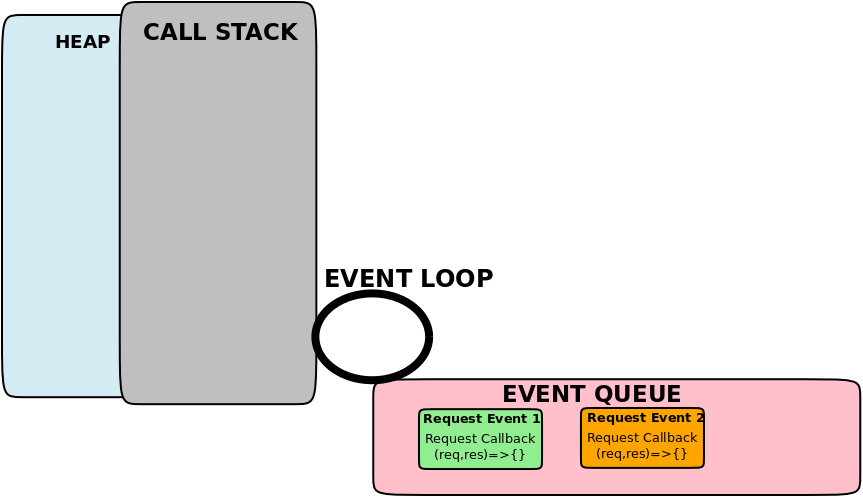
- Callbacks are executed in Call Stack by a single thread also known as the main thread.
- Callbacks include Request Callbacks.
- Callbacks are handled in the order they come.
- Callbacks are queued in Event queue prior to execution.
- Event queue is also known as Callback queue.
- Main thread executes one callback at a time.
- When Call Stack is empty and Event Queue has pending callbacks, Event Loop moves the first callback from Event Queue to Call Stack to be executed by main thread
- The while loop in the request callback is an example of a CPU intensive operation which blocked the main thread thereby making Event Loop unable to move callbacks.
Asynchronous/Non-blocking event
touch experiment3.js
nano experiment3.js
The contents of experiment3.js are as follows:
const express = require('express');
const app = express();

const ONE_SECOND = 1000;
const ONE_MINUTE = ONE_SECOND * 60;
let requestCount = 0;

app.get('/', (req, res) => {
  ++requestCount;

  req.customSerialId = requestCount;
  req.customStartDate = new Date();
  req.customCategory = requestCount % 2 === 1 ? "Delayed" : "Fast";

  console.log("Received a request with a customSerialId=" + req.customSerialId);

  if (requestCount % 2 === 1) {
    setTimeout(function () {
      req.customEndDate = new Date();
      res.send(`{ "serialId": ${req.customSerialId}, "category": ${req.customCategory}, "startDate": ${req.customStartDate}, "endDate": ${req.customEndDate} }`);
    }, ONE_MINUTE * 2);

  } else {
    req.customEndDate = new Date();
    res.send(`{ "serialId": ${req.customSerialId}, "category": ${req.customCategory}, "startDate": ${req.customStartDate}, "endDate": ${req.customEndDate} }`);
  }
});


app.listen(5000, () => console.log('Server ready'));
I ran experiment3.js as follows:
node experiment3.jsI then opened two terminals (preferably as tabs) and quickly issued the following command on both of them
curl http://localhost:5000/Findings
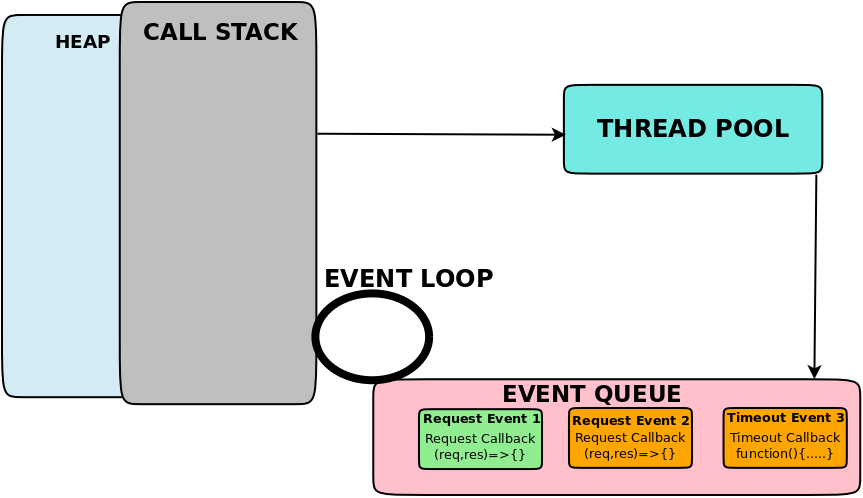
- setTimeout is an example of a non-blocking or asynchronous operation
- Asynchronous operation enables execution of the current callback to proceed without blocking
- Execution of an asynchronous operation is performed by Thread Pool in background (not in main single thread)
- After the execution of an asynchronous operation Thread Pool will send a corresponding callback to Event Queue aka Callback Queue.